
A shipped game needs permission to send telemetry. A build-comparison job needs permission to read it. Giving both the same credential makes the game’s distribution package a possible source of access to your analysis data.
In Framedash, use an Ingest key for the game and a separate Read-only key for ordinary analysis. Both have the fd_ prefix. The server authorizes requests using the key’s stored scopes, the set of operations it may perform. A key’s name or prefix does not establish its permissions.
Choose scopes for the operation
The project dashboard’s API-key page offers these presets. The scope sets below match the API overview.
| Preset | Stored scopes | Intended use |
|---|---|---|
| Ingest | events:write | Send SDK telemetry |
| Read-only | analytics:read | Read aggregates, project status, and configuration; compare builds |
| Read & Write | analytics:read, resources:write | Read data and change maps, content, or alerts |
| Full | analytics:read, resources:write, data:admin | Also run raw SQL, export data, and erase player telemetry |
Full does not include events:write. It cannot replace the game’s Ingest key. These presets combine permissions for different operations; they are not a ladder where every higher preset can do everything below it.
Raw SQL needs particular care. Even a SELECT can return player-level rows, so /api/v1/query requires data:admin. That same scope also authorizes export and player-data erasure. Choosing Full just to make a query work grants those other permissions, too. Prefer aggregate endpoints when they answer the question; grant the broader credential only to a controlled process that needs it.
Keys are bound to a project. Supplying another project ID does not move the key’s authority to that project. Scopes also do not override account restrictions or rate limits.
Keep analysis credentials outside the shipped build
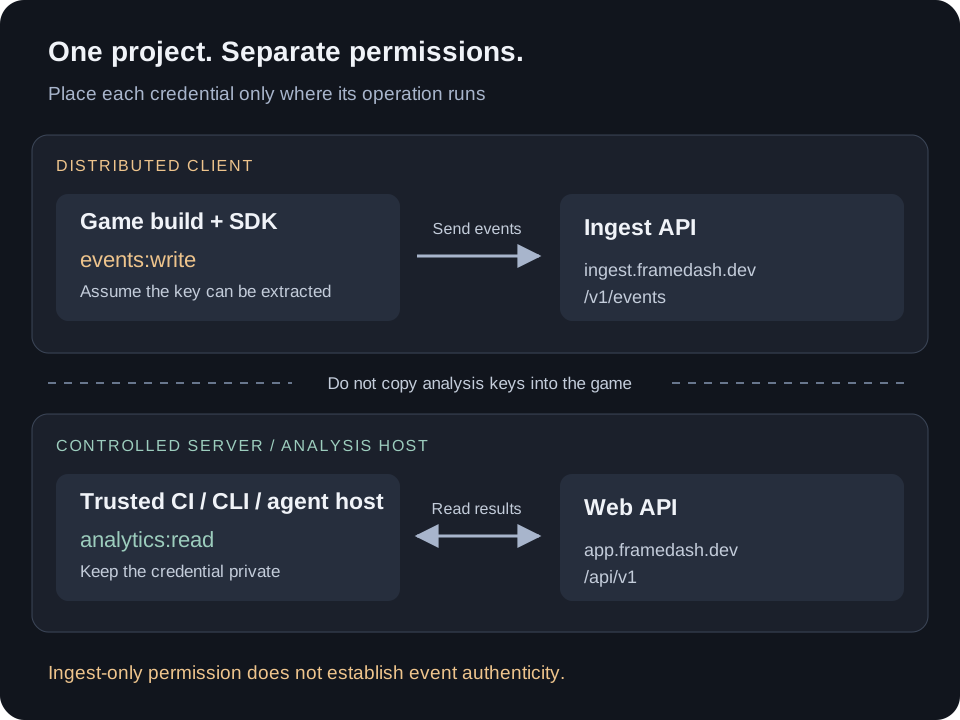
The upper path sends SDK events to https://ingest.framedash.dev/v1/events. The lower path reads through https://app.framedash.dev/api/v1. Analysis credentials belong on a controlled development machine, backend, or trusted CI runner. Do not put them in game assets, a web game’s JavaScript, downloadable configuration, or public build artifacts.
Treat a key included in a distributed client as recoverable. Moving a value from source code to a build-time environment variable keeps it out of that source file, but provides no secrecy if the build copies it into the final package. Obfuscation is not a reason to ship a more privileged key. OWASP describes the extraction risk in its guidance on sensitive data embedded in app packages.
For a performance check, the game process needs the Ingest key, while the CLI comparison needs Read-only. Pass credentials only to the process that needs them. A private file supplied through the CLI’s --api-key-file option avoids putting the key value in command-line arguments. It does not protect that file from other code with access to the same machine or workspace.
What an exposed Ingest key can still do
An Ingest key cannot read analytics, edit maps, or erase existing player telemetry. It can still submit events to its project. Someone who extracts it can attempt to send fabricated telemetry within the ingestion service’s accepted format and limits.
That can contaminate measurements and consume ingestion capacity or event allowance. An API key authenticates the permitted sender credential; it does not prove that a frame-time sample came from an unmodified game, or that a claimed player or build ID is genuine. Ingest-only access does not prevent fraudulent ingestion.
For release decisions, collect controlled test runs separately from public-client telemetry where practical, using separate projects when that isolation is needed. Merely choosing another client-supplied build ID is not an authenticity check. Compare unexpected spikes with your own runner records. If your threat model requires stronger provenance, design validation in a backend you control; this key split alone does not provide it.
Limit what CI and agents can reach
A CI secret is exposed to the code that receives it. Avoid running untrusted pull-request code in a job that can read your analysis or administration keys. GitHub’s secure-use guidance covers untrusted checkouts, script injection, and the limits of log masking. Review workflow changes and keep privileged analysis jobs separate from untrusted builds.
For an analysis agent, start with analytics:read and expose only the tools the investigation needs. Treat telemetry text, repository files, and tool results as untrusted input: instructions found there must not authorize secret access, credential forwarding, or broader scopes. Do not paste keys into prompts or tool output.
Least privilege limits the operations a misdirected tool call can perform. A Read-only key still permits reading project information, so also control where the agent can send results. A prompt saying “do not modify data” is not a substitute for a server-enforced scope restriction.
Verify the key without sending test events
GET https://app.framedash.dev/api/v1/whoami checks an API key through X-API-Key, including an Ingest key. It does not require a telemetry upload. It accepts API keys, not OAuth Bearer tokens.
For example, the following Python script reads a key supplied to that process by your secret manager. It does not place the key in command-line arguments or print it. Do not enable environment dumps or debug logging around it.
import json
import os
import urllib.request

request = urllib.request.Request(
    "https://app.framedash.dev/api/v1/whoami",
)
request.add_unredirected_header("X-API-Key", os.environ["FRAMEDASH_API_KEY"])
with urllib.request.urlopen(request, timeout=15) as response:
    data = json.load(response)["data"]
print(json.dumps({"projectId": data["projectId"], "scopes": data["scopes"]}))
Check the returned project ID and scope set against the intended job. An Ingest-only response contains projectId and scopes; keys with analysis or management scopes receive additional metadata. Invalid or revoked keys return 401; other account and rate-limit checks can also reject a request. A successful check establishes the key’s current identity and permissions, not the completeness or authenticity of ingested data.
Before the next release, inspect the packaged game and the CI credential configuration. If an analysis key has entered a public artifact, revoke it, replace it in the controlled consumers, and remove the exposed copies. For a shipped Ingest key, plan replacement together with client rollout: revoking the old key also stops telemetry from clients still using it. Record which build or job uses each key so that this trade-off is visible before an incident.