
A position event sent five times a second and a level-completion event sent once per playthrough need different sampling policies. Reducing both to 10% leaves plenty of positions across a long session, but gives that one completion event only a 10% chance of passing the sampling check.
Event sampling keeps each eligible event with a chosen probability. Start by deciding which questions the data must answer, then assign a rate to each event name. For repeated state observations, partial coverage may be enough. For a failed attempt or a completed checkpoint, each occurrence can matter.
The settings below are checked against the source of Framedash Unity SDK 0.1.8 and concern the Track event path. The opt-in per-frame performance-run capture uses a separate path. The numeric workload is hypothetical, not a Framedash benchmark or a recommendation to use these rates in every game.
Separate recurring observations from state changes
For each event, write down when the game calls it and what you intend to count:
player_position: a recurring observation used to examine broad movement patternsplayer_death: one call when the player enters the dead statelevel_completed: one call when the level transitions to completed
The last two belong in the transition code. Calling player_death on every frame while health is zero creates duplicates before sampling even begins. A lower sampling rate would hide some duplicates without repairing the event definition.
Choose the position-call interval independently. A five-per-second timer and a 10% retention probability are two controls: the first determines when observations are attempted; the second randomly selects from those observations. Their combination averages 0.5 retained positions per second over many calls. It does not produce one observation every two seconds, and it cannot guarantee a maximum gap.
If the question requires the exact route through a short encounter, random position sampling may leave too many gaps. Use a bounded diagnostic recording appropriate to that question, or preserve explicit entry and exit events for the encounter. Neither is supplied automatically by choosing a higher rate for an unrelated event.
Estimate the custom-event volume
Assume a 20-minute session with exactly 6,000 position calls, three deaths, and one level completion. The following numbers describe expected events passing the sampling check, before buffering, transmission, or ingestion.
| Custom event | Calls in the hypothetical session | Keep all | Keep 10% of every type | Positions 10%, milestones 100% |
|---|---|---|---|---|
player_position | 6,000 | 6,000 | 600 | 600 |
player_death | 3 | 3 | 0.3 | 3 |
level_completed | 1 | 1 | 0.1 | 1 |
| Total | 6,004 | 6,004 | 600.4 | 604 |
Expected counts can be fractional; the actual count in one session is an integer. Under the independent random-sampling model, keeping each of the four milestones with probability 0.1 gives a 0.9^4, or about 66%, probability of retaining none of them. Protecting those four events barely changes this example’s volume while preserving them at the sampling stage.
This table excludes SDK-generated events and any other instrumentation. It estimates neither a bill nor a delivered-event count. Payload sizes, session lengths, other event types, and delivery outcomes still matter.
Configure per-event rates after initialization
With the SDK initialized successfully, apply the policy before gameplay starts:
using Framedash;

// Run after the project's TelemetrySDK.Initialize(...) call.
var sdk = TelemetrySDK.Instance;
sdk.SetEventSamplingRate("player_position", 0.10f);
sdk.SetEventSamplingRate("player_death", 1.0f);
sdk.SetEventSamplingRate("level_completed", 1.0f);
sdk.SetEventSamplingRate("map_load", 1.0f);
These event names must match the names your game actually uses. player_position, player_death, and level_completed are application-defined names in this example; setting a rate does not cause the SDK to generate them. map_load is emitted through the SDK’s map-load reporting methods.
The Unity SDK guide documents the per-event override. In the 0.1.8 sampling implementation, an event-specific rate replaces the global rate. A global rate of 0.1 and an event override of 1.0 therefore use 1.0 for that event, not 0.1 multiplied by 1.0. Names are case-sensitive, and numeric rates are clamped to the range from 0 to 1. Pass finite values in that range.
The global default is 1.0, stored in the component’s serialized sampling field and read during initialization. For a small event catalog, leaving that default in place and lowering only named high-volume events makes the policy easy to review. An unlisted new event then retains the default; review new event names so accidental high-frequency calls do not go unnoticed. The setting and initialization are visible in TelemetrySDK.cs.
To remove a temporary override:
sdk.RemoveEventSamplingRate("player_position");This restores the global rate, which may not be 1.0 in your project. Overrides are runtime state: reapply them after an SDK shutdown and reinitialization. Changing a rate affects subsequent sampling decisions, not events already buffered or discarded.
Know which SDK events bypass sampling
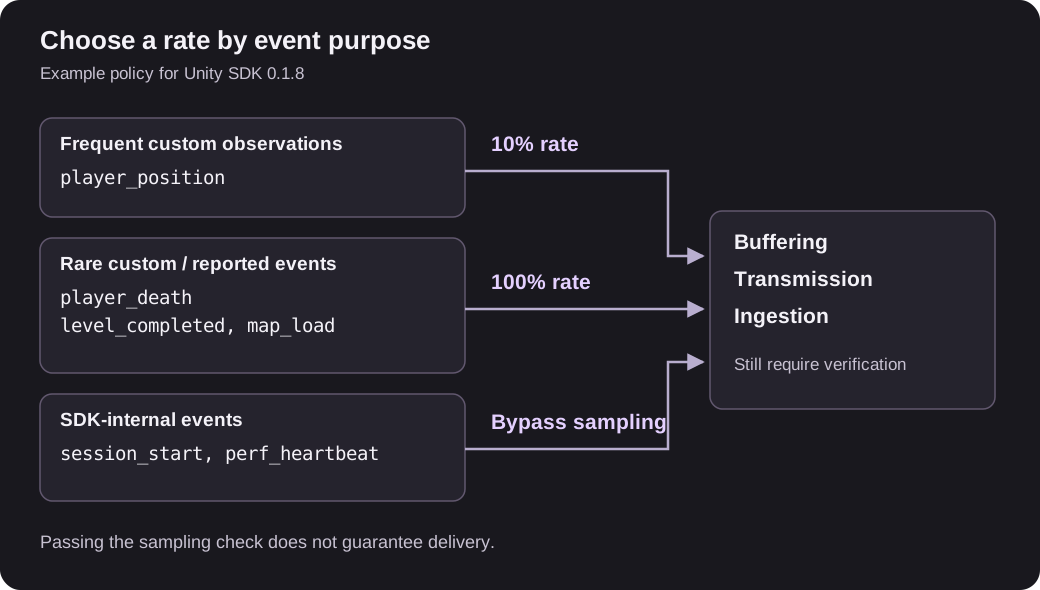
The tracking implementation distinguishes these paths:
- Internal
session_startandperf_heartbeatevents bypass event sampling - Custom
Track(...)calls use the per-event rate, or the global rate if no override exists map_loadfromEndMapLoad()orReportMapLoad(...)goes throughTrack(...), so its sampling policy still applies
Here, “automatic” refers to the SDK’s internal path. BeginAutomatedSession(...) adds session metadata; it does not make custom events bypass sampling. Reusing an internal event name in a custom Track call does not select the internal path either.
A rate of 1.0 means that valid calls are not rejected by the sampling decision. It does not guarantee delivery: initialization, validation, buffer capacity, shutdown, and network or ingestion failures remain separate concerns. This also applies to the SDK events that bypass sampling.
Sampling reduces work only after the sampling check. In this SDK, Track checks the rate before preparing the serializable attributes and collecting the event’s performance snapshot. Any dictionary allocation or computation your game performs before calling Track has already happened. If that work is costly, reconsider the call cadence and payload preparation as well as the rate.
Keep the meaning of counts and ratios
A sampled event count describes retained observations. If 600 events remain from a stream sampled at a known, fixed rate of 0.1, dividing by 0.1 gives an estimate of 6,000 original calls, under the random-sampling model and assuming no additional loss. It does not reconstruct the missing timestamps, positions, or session history.
Record the sampling policy with the build or test configuration. If rates change during a run, keep enough information in your own instrumentation records to separate those periods. A single correction factor cannot recover an unknown mixture of rates. Do not assume that an existing dashboard automatically applies inverse-probability weighting.
Ratios need compatible event definitions and populations. To calculate completions per attempt, define the attempt-start and completion events together and retain both without sampling if the volume permits. Dividing an unsampled completion count by sampled position observations is not a completion rate. Even with both rates at 1.0, check for duplicate calls and missing deliveries before interpreting the result.
Individual event sampling also breaks event sequences. A retained completion with no retained start does not establish that the player skipped the start. Avoid reconstructing a complete funnel or a single player’s route from a sparsely sampled stream.
Test the policy with known calls
Use a development run with a known scenario before rolling out the policy:
- Count the custom calls your scenario makes, separately from what reaches the backend
- Verify that rare events fire once at their intended transitions, including retry and restart paths
- Temporarily set a high-volume test event to 0, then to 1, and check that the observed behavior changes as expected; SDK-internal events should remain outside this test count
- Restore the intended rate and repeat enough calls to see variation around the expected count, without requiring an exact percentage in each session
- Verify buffered-event handling and shutdown delivery separately using the SDK’s flush and diagnostic guidance
Keep the call interval, per-event rates, and the question each event answers in the same instrumentation review. The next developer adding an event should be able to tell whether a missing sample is tolerable before copying the nearest Track call.